

Benzinga Pro
Real-time market news, audio squawk, and actionable alerts for traders
Our Verdict
Benzinga Pro is the fastest retail news platform for active traders. The Audio Squawk alone sets it apart from every competitor in its price range — but pair it with a dedicated charting tool, because Benzinga Pro does not try to be an all-in-one trading platform.
Best for: Active day traders and swing traders who trade around news catalysts and need breaking headlines before price action occurs
Our Experience
Benzinga Pro in Action
Who Should Use Benzinga Pro
Benzinga Pro is built for active day traders and swing traders who trade around news catalysts. If you make multiple trades per day and need breaking headlines before price action occurs, the Audio Squawk and real-time newsfeed provide a genuine speed advantage — delivering stories seconds to minutes ahead of free sources, and up to thirty minutes ahead for exclusive Benzinga-reported scoops. Options traders monitoring earnings season, FDA events, and unusual activity will find the twelve-plus calendar suite and signals module particularly valuable. The platform also suits multi-screen traders who benefit from hands-free audio alerts while analyzing charts on a separate tool. If speed of information is your primary edge, Benzinga Pro belongs in your workflow.
Who Should Avoid Benzinga Pro
Long-term investors who hold positions for months or years gain nothing from sub-second news delivery — the speed premium is wasted on a buy-and-hold strategy. Technical analysis traders who rely on advanced charting, custom indicators, or scripting languages should look at TradingView instead, as Benzinga Pro's charts are basic at best. Beginners still learning fundamental trading concepts will find the platform overwhelming — the dense interface and lack of onboarding materials create a steep learning curve. Passive investors who check portfolios monthly and traders with accounts under ten thousand dollars are unlikely to recoup the subscription cost through faster news alone. If you cannot act on breaking news within minutes, the platform's core value proposition does not apply to you.
What is Benzinga Pro?
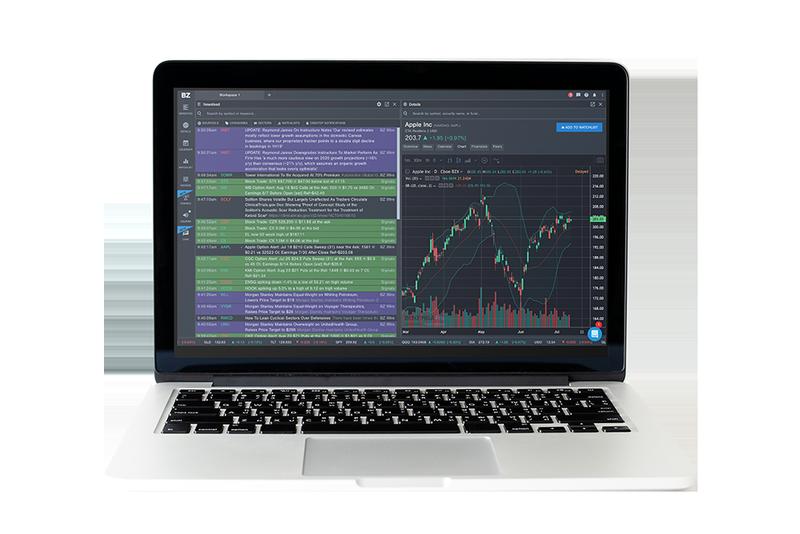
Benzinga Pro delivers real-time market news and trading signals faster than mainstream financial media. Its Audio Squawk broadcasts breaking news as it happens from six in the morning to six in the evening Eastern, and the platform provides customizable alerts for earnings, SEC filings, analyst ratings, and unusual options activity. A patented sentiment engine rates each headline for directional probability, and the real-time scanner monitors over three thousand stocks with configurable refresh intervals. Built for active traders who need speed.
Key Strengths
The Audio Squawk is Benzinga Pro's most distinctive feature and the primary reason active traders subscribe. Broadcasting live from six in the morning to six in the evening Eastern, a newsdesk team reads breaking headlines, block trades, earnings data, and economic releases aloud in real time. This hands-free delivery lets traders absorb market-moving news without shifting attention from charts or order entry — an advantage that multiple reviewers describe as the single feature that justifies the subscription cost.
News delivery speed sets Benzinga Pro apart from free alternatives and most paid competitors. The platform claims a thirty-minute advantage for exclusive Benzinga-reported stories — M&A rumors, drug trial results, and earnings surprises that break on the platform before competing outlets publish. For standard market news, the advantage is seconds to minutes. The patented sentiment engine adds directional probability indicators to each headline, helping traders quickly assess whether news is likely to move a stock up or down.
The calendar and signals suite consolidates twelve-plus event types — earnings, analyst ratings, FDA decisions, IPOs, dividends, SEC filings, and unusual options activity — into a single filterable interface. Combined with automatic alerts for price spikes, trading halts, and opening gaps, this eliminates the need to monitor multiple separate tools. One reviewer noted that Benzinga Pro provides substantially more of what active traders need compared to competing platforms that cost more.
The platform's cost-to-value ratio is compelling when measured against institutional alternatives. At roughly one hundred fifty dollars per month for the Essential plan, Benzinga Pro delivers real-time news, a scanner, signals, and audio alerts — capabilities that would cost upward of two thousand dollars per month on a Bloomberg terminal. Annual billing reduces the effective rate further, and the fourteen-day free trial lets traders evaluate the full feature set before committing.
Key Weaknesses
The absence of trade execution integration is Benzinga Pro's most frustrating limitation. The platform operates as a standalone news and research terminal — you can link a brokerage account for read-only access, but you cannot place orders from within the interface. This forces traders to run Benzinga Pro alongside a separate broker platform, adding friction to the exact moment speed matters most. For a product that sells itself on reaction time, the inability to act on news without switching windows undermines the core value proposition.
Billing practices and customer support draw persistent criticism. On Trustpilot, where Benzinga Pro holds a 2.9 out of 5 rating across over seven hundred reviews, the most common complaints involve aggressive upselling during the free trial sign-up, unexpected credit card charges, and a restrictive refund policy — seven days from purchase, account credit only, no cash refunds. Multiple reviewers report difficulty reaching customer support. The sixteen percent one-star review rate reflects genuine frustration with the business practices surrounding an otherwise strong product.
Charting and technical analysis capabilities are minimal. Benzinga Pro includes basic charts but lacks the depth, customization, and indicator library that technical traders require. There is no backtesting functionality, no custom scripting, and no advanced drawing tools. Traders who rely on chart-based strategies will need a dedicated charting platform like TradingView running alongside Benzinga Pro, which adds both cost and screen complexity to the workflow.
What Users Say
Key Features
Benzinga Pro Pricing
Free (BZWire)
- ✓ Unfiltered real-time newsfeed
- ✓ Earnings calendar
- ✓ Dividend calendar
- ✓ M&A tracking
Basic
- ✓ NASDAQ real-time quotes
- ✓ Full newsfeed with basic filters
- ✓ Watchlist alerts
- ✓ Chat access
- ✓ Movers tool
Streamlined
- ✓ All Basic features
- ✓ Audio Squawk
- ✓ Advanced newsfeed filtering
- ✓ Block trade alerts
Essential
- ✓ All Streamlined features
- ✓ Real-time scanner (3,000+ stocks)
- ✓ Premium signals
- ✓ 12+ calendar suite
- ✓ Benzinga AI
- ✓ Benzinga Edge research
Essential Annual
- ✓ All Essential features
- ✓ Save 15-17% vs monthly billing
Integrations
Getting Started
Getting started with Benzinga Pro takes under five minutes. Visit pro.benzinga.com and click the free trial button — you will need a credit card, though you will not be charged for fourteen days. Once inside, the platform opens with a default workspace showing the newsfeed, movers, and watchlist panels. Start by configuring your watchlist with the tickers you trade most frequently, then set up custom alerts — you can choose sound notifications, desktop pop-ups, or email delivery for specific stocks and news categories. To enable the Audio Squawk on Streamlined or Essential plans, click the Squawk icon in the left sidebar and adjust volume settings. The scanner, available on Essential, is accessed through the Scanner tab — set filters for price range, volume, market cap, and relative volume, then choose a refresh interval. Multiple workspaces can be created for different trading strategies or market sessions. For multi-monitor setups, pop out individual panels into separate browser windows. To cancel, send a written request to the subscriptions email address before the renewal date.
Pricing Analysis
Benzinga Pro's pricing spans four tiers. A free BZWire newsfeed provides unfiltered real-time headlines at no cost. The Basic plan at thirty-seven dollars per month adds NASDAQ real-time quotes, watchlist alerts, and chat access. Streamlined at one hundred forty-seven dollars per month unlocks the Audio Squawk and advanced newsfeed filtering. Essential — also at one hundred forty-seven dollars per month with current promotional pricing, though historically listed at one hundred ninety-seven dollars — adds the real-time scanner, signals, twelve-plus calendars, and Benzinga AI. Annual billing reduces costs by fifteen to seventeen percent, bringing the Essential plan to roughly one hundred seventeen dollars per month. The High Beta Squawk, focused on volatile stocks during market hours, is an add-on at forty-nine to ninety-nine dollars per month. A fourteen-day free trial covers the full Essential feature set, though a credit card is required and automatic renewal applies. The refund window is seven days from purchase — account credit only. Compared to Bloomberg at two thousand dollars per month, Benzinga Pro Essential delivers a meaningful subset of institutional-grade news tools at roughly one-tenth the cost. Against retail competitors, the Essential plan is more expensive than Finviz Elite or Seeking Alpha but cheaper than Trade Ideas, with the Audio Squawk as the key differentiator justifying the premium.
How Benzinga Pro Compares
Benzinga Pro occupies the real-time news niche for active retail traders, positioned between free financial media and institutional terminals. Bloomberg Terminal remains the gold standard for professional trading desks but costs roughly twenty-four thousand dollars per year — making Benzinga Pro at under two thousand dollars annually a fraction of that price. TradingView offers superior charting with hundreds of indicators and Pine Script starting at roughly seventeen dollars per month, but its news integration is secondary. Trade Ideas provides AI-powered scanning for approximately one thousand dollars per year but lacks the live audio squawk that distinguishes Benzinga Pro. Seeking Alpha focuses on in-depth fundamental research from two hundred ninety-nine dollars per year, serving a different audience. Finviz Elite delivers stock screening and visualization for three hundred dollars per year but without real-time news delivery or audio. Where Benzinga Pro wins is at the intersection of speed, audio delivery, and sentiment analysis — no other retail platform matches its sub-minute news advantage paired with a live squawk broadcast.
The Bottom Line
Benzinga Pro is the fastest retail news platform for active traders, and the Audio Squawk alone sets it apart from every competitor in its price range. If you day trade or swing trade around news catalysts, the speed advantage and sentiment indicators are worth the subscription cost — but pair it with a dedicated charting tool, because Benzinga Pro does not try to be an all-in-one trading platform.
Sources
Explore More
Compare with similar tools →
Full pricing plan breakdown →
Side-by-side comparison →
Side-by-side comparison →
Side-by-side comparison →
Side-by-side comparison →
Ready to try Benzinga Pro?
Try Benzinga Pro