
QuantConnect
Open-source algorithmic trading platform with cloud backtesting and 400TB+ built-in data
Our Verdict
QuantConnect is the most powerful free platform for algorithmic trading development. The combination of an open-source engine, 400TB+ built-in data, and unlimited free backtesting is unmatched — provided you can code in Python or C#.
Best for: Quant developers and Python/C# programmers who want to build, backtest, and deploy trading algorithms on institutional-grade infrastructure
Our Experience
QuantConnect in Action


Who Should Use QuantConnect
QuantConnect is built for developers who think in code. If you write Python or C# and want to build, test, and deploy trading algorithms on institutional-quality infrastructure, this platform removes the barriers that typically require six-figure budgets to overcome. Quant researchers and data scientists benefit from the four-hundred-terabyte data library and Jupyter notebook integration — no data procurement, no pipeline engineering, just research. Algorithmic traders who want backtest-to-live continuity will appreciate that the same code runs identically across all environments, eliminating the translation errors that plague other workflows. Small trading firms looking to avoid building custom infrastructure can deploy multiple strategies with team collaboration features starting at the Team tier. Students and learners gain access to a genuinely powerful free tier with unlimited backtesting — a resource that did not exist when most current quants were learning the craft. If you trade US equities, options, futures, forex, or crypto and prefer automation over discretion, QuantConnect deserves a serious evaluation.
Who Should Avoid QuantConnect
Traders who do not code — or do not intend to learn — will find QuantConnect unusable. There is no visual strategy builder, no drag-and-drop interface, and no way to create algorithms without writing Python or C#. Discretionary traders who rely on charting, drawing tools, and visual pattern recognition should look at TradingView or ProRealTime instead. European equity traders face a hard blocker — QuantConnect does not connect to any EU exchanges, so strategies involving Euronext, Xetra, or the London Stock Exchange are impossible. Traders who need a polished, stable IDE should be aware that the browser-based editor has documented reliability issues, and the workaround is local development via CLI. Anyone seeking a simple, low-cost setup for a single live strategy may find the per-node pricing adds up quickly once you move beyond the free tier. High-frequency traders requiring sub-millisecond execution will also hit limitations — the platform targets systematic and quantitative strategies, not ultra-low-latency arbitrage.
What is QuantConnect?
QuantConnect is an open-source algorithmic trading platform built on the LEAN engine that lets you write strategies in Python or C#, backtest them against 400TB+ of historical data, and deploy them live through 20+ broker integrations. The platform serves over 475,000 quant developers across 170+ countries, processing $45 billion in notional volume monthly. With unlimited free backtesting, event-driven simulation, and institutional-quality data spanning US equities, options, futures, forex, and crypto, QuantConnect provides infrastructure that previously required six-figure budgets.
Key Strengths
The open-source LEAN engine is QuantConnect's most distinctive asset. With over seventeen thousand GitHub stars, forty-six hundred forks, and two hundred seventeen contributors, it is the most actively developed open-source algorithmic trading engine available. The Apache 2.0 license means you can audit every line of execution logic, run the engine locally via Docker, or modify it for custom use cases. This level of transparency is unmatched by any competing cloud platform and gives users confidence that their backtests reflect reality rather than a black box.
The built-in data library eliminates what is typically the most expensive and time-consuming part of quantitative research. Over four hundred terabytes of historical data — spanning US equities since 1998, options, futures, forex, crypto, and forty-plus alternative data vendors — are available without additional cost on paid plans. All data is delivered point-in-time to prevent look-ahead bias. For independent quant developers who would otherwise spend thousands of dollars annually on data subscriptions and weeks on data engineering, this is a transformative advantage.
Backtest-to-live continuity sets QuantConnect apart from platforms that require rewriting strategies for production. The same Python or C# code runs identically in backtesting, paper trading, and live trading environments without modification. The event-driven simulation engine applies realistic fees, slippage, and spreads, so results translate more faithfully to real markets. Multiple users have confirmed that live performance closely tracks backtest expectations when strategies are properly designed — a claim few platforms can credibly make.
The free tier is remarkably generous for algorithm development. Unlimited backtesting across all asset classes, a research notebook environment, community data, and community support — all available without a credit card. No competing platform offers this depth of free access for algorithmic trading research. The free tier alone is sufficient for learning, prototyping, and validating strategies before committing to paid infrastructure for live deployment.
Key Weaknesses
The learning curve is steep and the documentation does not adequately bridge the gap. While the API reference is comprehensive, conceptual documentation — explaining when and why to use specific framework components — is sparse. Multiple users report needing to purchase a separate thirty-six-dollar book to understand the platform deeply. Forum threads and community notebooks fill some gaps, but a platform with nearly half a million users should have more structured onboarding materials.
The browser-based IDE has persistent stability issues that undermine the development experience. Users report files failing to save, projects refusing to open for hours, and algorithms breaking after platform updates. A December 2025 update specifically broke algorithm warm-up processes for live strategies, causing them to skip initialization entirely. While the LEAN CLI and local development provide a workaround, the cloud IDE is often the first experience new users encounter — and it sets a poor first impression.
The absence of European exchange support is a hard limitation with no workaround. QuantConnect cannot connect to Euronext, Xetra, the London Stock Exchange, or any other EU venue. This eliminates the platform for any strategy involving European equities or ETFs. Given the platform's otherwise broad multi-asset coverage, this gap is conspicuous and has drawn consistent criticism in user reviews.
What Users Say
Key Features
QuantConnect Pricing
Free
- ✓ Unlimited backtesting
- ✓ Community data (minute/daily)
- ✓ Research notebook
- ✓ All asset classes
- ✓ Community support
Researcher
- ✓ Tick/second data resolution
- ✓ Local coding via LEAN CLI
- ✓ 1 micro live trading node
- ✓ 1 backtest node
- ✓ Expanded dataset access
Team
- ✓ Project collaboration
- ✓ 2-10 users
- ✓ Up to 10 compute nodes
- ✓ Increased file and log limits
Trading Firm
- ✓ Unlimited compute nodes
- ✓ 2 backtest nodes included
- ✓ Permissions management
- ✓ Up to 1,000 members
Institution
- ✓ On-premise platform
- ✓ AES-256 code encryption
- ✓ FIX/professional brokerages
- ✓ 4 live + 4 backtest nodes
- ✓ Gold support included
Integrations
Getting Started
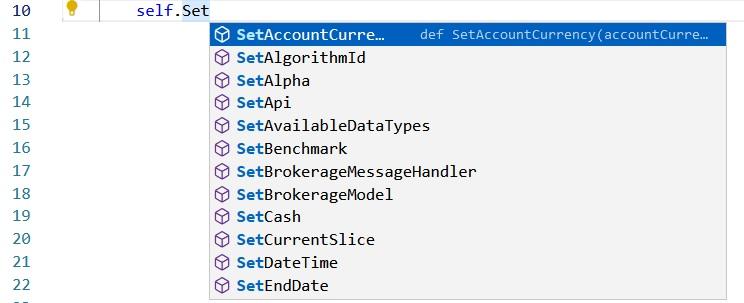
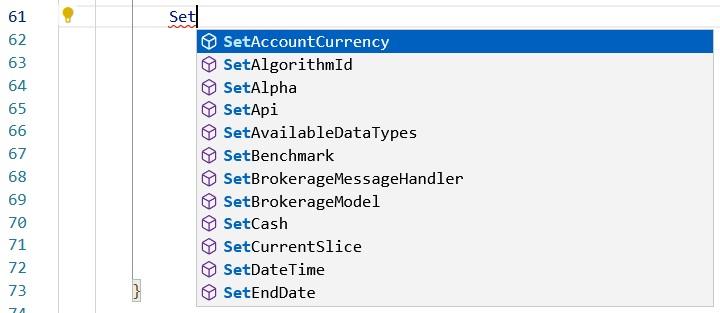
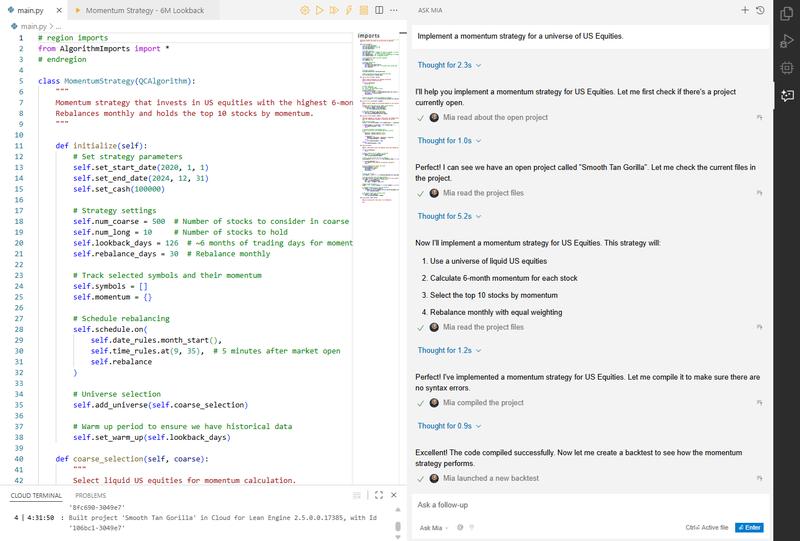
Getting started with QuantConnect takes under five minutes. Visit quantconnect.com and create a free account — no credit card required. You land directly in the Algorithm Lab, a browser-based IDE where you can start writing strategies immediately. Click "Create New Algorithm" and choose Python or C# as your language. The platform provides over one hundred fifty demo strategies that you can clone and modify to learn the API. For a basic momentum strategy, use the Initialize method to set your start date, cash allocation, and universe of securities, then implement OnData to define your trading logic. Click "Backtest" to run your strategy against historical data — a ten-year equity backtest completes in roughly thirty seconds. Results display an equity curve, trade log, performance statistics, and risk metrics. For local development — which we recommend for serious work — install the LEAN CLI with `pip install lean`. This lets you write code in VS Code or any preferred editor, run backtests locally via Docker, and push to the cloud for paper or live trading. The command `lean init` scaffolds a new project, and `lean backtest` runs it locally. To deploy live, connect a brokerage account through the platform's integrations panel. Interactive Brokers, Alpaca, TradeStation, and Charles Schwab are among the twenty-plus supported brokers. Test with the built-in paper trading account first — it provides one hundred thousand dollars in virtual capital and mirrors live execution behavior. When ready, switch to your funded brokerage account and deploy with a single click.
Pricing Analysis
QuantConnect's pricing structure balances a genuinely free entry point with modular paid tiers that scale to institutional needs. The free plan includes unlimited backtesting across all asset classes, community data at minute and daily resolution, and a research notebook — no credit card required. This is the most generous free tier in the algorithmic trading space and is sufficient for learning, prototyping, and validating strategies. The Researcher plan at sixty dollars per month unlocks tick and second-resolution data, local development via the LEAN CLI, and a single micro live trading node. For an individual developer ready to deploy one strategy live, this is the natural entry point. The Team plan at one hundred twenty dollars per month adds collaboration features and supports two to ten users — reasonable for a small quant team. Where costs escalate is in scaling live operations. Each additional live trading node costs twenty-four to seventy-eight dollars per month, and backtest nodes range from fourteen to ninety-six dollars. GPU nodes for machine learning workloads cost four hundred dollars monthly. Running three or four live strategies with adequate backtesting capacity can push monthly costs above three hundred dollars — a material expense for independent traders. Support is also a paid add-on, starting at seventy-two dollars per month for Bronze. Compared to building custom infrastructure — renting servers, buying data feeds, engineering pipelines — QuantConnect's pricing is competitive. The platform's own "build vs. buy" calculator estimates that equivalent in-house infrastructure costs ten to one hundred times more. Against other platforms, the free tier outperforms Backtrader on data access and cloud convenience, while paid plans cost less than dedicated quant infrastructure from providers like QuantRocket or custom AWS deployments. The annual billing option saves roughly seventeen percent across all tiers.
How QuantConnect Compares
QuantConnect occupies a unique position as the only major cloud-based algorithmic trading platform built on a fully open-source engine. Backtrader is its closest open-source competitor — free, Python-native, and popular for local backtesting — but it lacks cloud infrastructure, built-in data, and live broker integrations at scale. TradingView dominates charting and community features with over fifty million users and Pine Script, but Pine Script cannot match the flexibility of Python or C# for quantitative strategies, and TradingView does not offer event-driven backtesting or institutional-grade data. MetaTrader 5 has wider retail broker support and MQL5 scripting, but its backtesting engine uses a simpler model and the language is niche. ProRealTime offers charting combined with European exchange access — a gap QuantConnect cannot fill — but lacks the data depth and open-source transparency. Zipline, once the leading Python backtesting library, is no longer actively maintained. For developers who want production-ready algorithmic trading with built-in data, QuantConnect's combination of open-source transparency, cloud infrastructure, and a genuinely useful free tier is unmatched — provided you trade markets the platform supports.
The Bottom Line
QuantConnect is the most powerful free platform for algorithmic trading development. The combination of an open-source engine, four hundred terabytes of built-in data, and unlimited free backtesting creates an environment that no competitor matches at any price — let alone at zero cost. If you code in Python or C# and trade US equities, options, futures, forex, or crypto, this platform removes the infrastructure barriers that once required institutional budgets. The learning curve is real, the IDE needs polish, and European markets are absent — but for quant developers willing to invest the time, QuantConnect is the standard against which other algo trading platforms should be measured.
Sources
Explore More
Compare with similar tools →
Full pricing plan breakdown →
Side-by-side comparison →
Side-by-side comparison →
Side-by-side comparison →
Side-by-side comparison →
Ready to try QuantConnect?
Try QuantConnect